

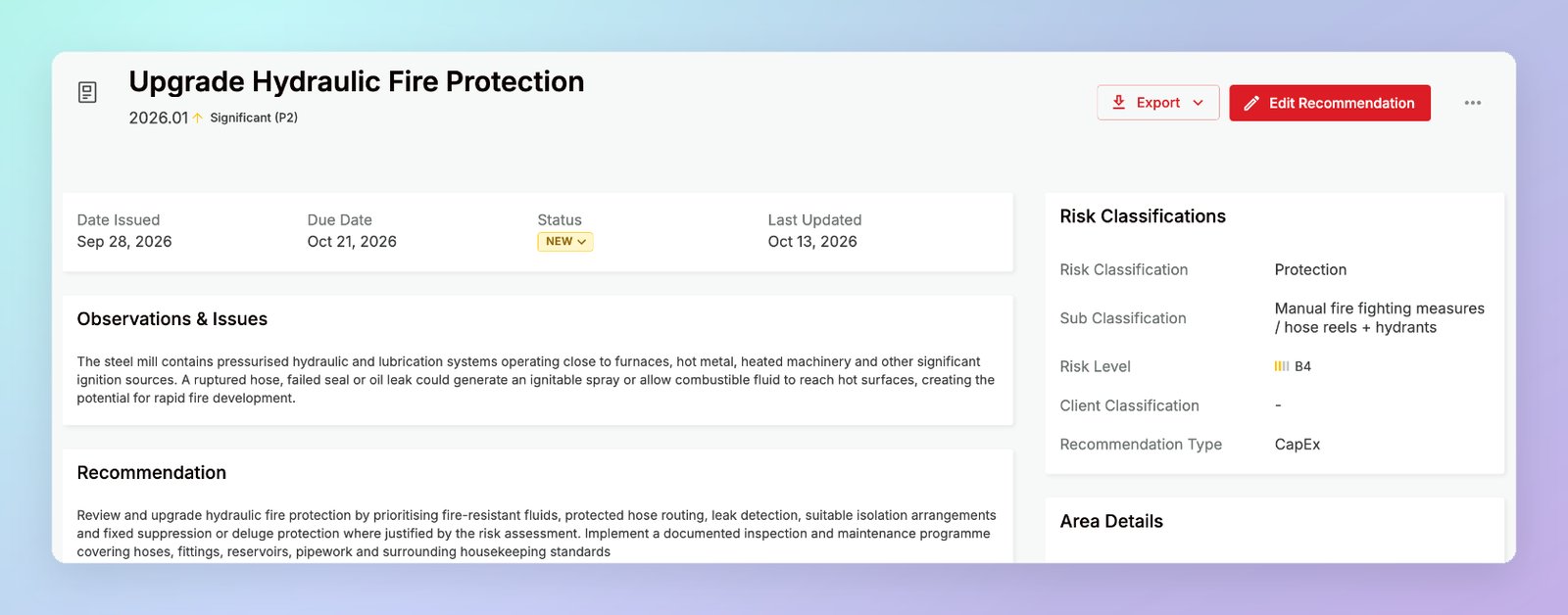
Header
The header shows the recommendation’s name, its reference (for example, 2026.01), and its priority. The following actions are available:- Export — download the recommendation as Microsoft Word (.docx) or Comma-separated values (.csv)
- Edit Recommendation — update any of the recommendation’s details
···menu — Export or Delete the recommendation
Key dates and status
The top of the record shows:Observations & Issues and Recommendation
The main panel shows the Observations & Issues (what was found during the survey) and the Recommendation (the action the client should take).Responses
Responses is where engineers and clients communicate about the recommendation — for example, progress updates, feedback on status changes, or end-of-year assessments.- Engineers post responses from the engineer portal. When an engineer posts a response, the contact assigned to the recommendation receives an email notification.
- Clients post responses from their Client Portal. When a client posts a response, the assigned engineer is notified.
Contact
The client contact responsible for the recommendation. Click Add Contact to assign one.Assign a contact to every recommendation you share with a client — otherwise no one on the client’s side is notified when you post a response.
Details panels
The panels on the right of the record summarise the recommendation’s details, as entered when it was created or last edited:- Risk Classifications — the risk classification and sub classification, Risk Level, Client Classification, and Recommendation Type
- Area Details — the building or structure and coordinates, plus links to the Survey, Site, and Client the recommendation belongs to
- Loss Estimates — the cost to complete and the estimated loss before and after completion (property surveys only)
Related pages
Creating & managing recommendations
Field definitions, statuses, filters, and exports
Contacts & portal access
Add the contacts you assign to recommendations